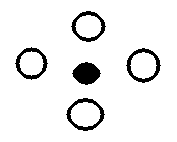
Start at a point inside the figure and paint with a particular color. Filling continues until a boundary color is encountered.
Thjere are two ways to do this:
1. Four-connected fill where we propagate : left right up down
Procedure Four_Fill (x, y, fill_col, bound_col: integer);
var
     curr_color: integer;
begin
     curr_color := inquire_color(x, y)
     if (curr_color <> bound color) and (curr_color <> fill_col) then
     begin
         set_pixel(x, y, fill_col)
         Four_Fill (x+1, y, fill_col, bound_col);
         Four_Fill (x-1, y, fill_col, bound_col);
         Four_Fill (x, y+1, fill_col, bound_col);
         Four_Fill( x, y-1, fill_col, bound_col);
end;
There is the following problem with four_fill:
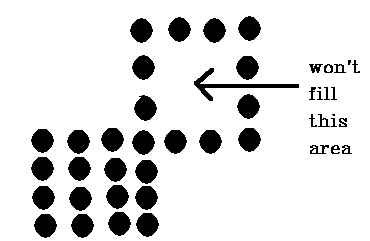
Thisd leads to the 2. Eight-connected fill algorithm where we test all eight adjacent pixels.
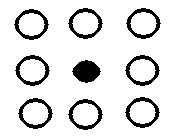
So we add the calls:
eight_fill (x+1, y-1, ...........)
eight_fill (x+1, y+1, ..........)
eight_fill (x-1, y-1, ............)
eight_fill (x-1, y+1, ...........)
Note: above 4-fill and 8-fill algorithms involve heavy duty
recursion which may consume memory and time. Better algorithms
are faster, but more complex. They make use of pixel runs
(horizontal groups of pixels).
1. Fill in row with START pixel
2. Find RIGHTMOST pixel for line above first row - push on stack
3. Find RIGHTMOST pixel for line below first row - push on stack
4. Pop stack and goto 1
Repeat above until stack empty.
General Problem for boundary fill - requires a unique boundary color
Might do (for 2 overlapping polys)
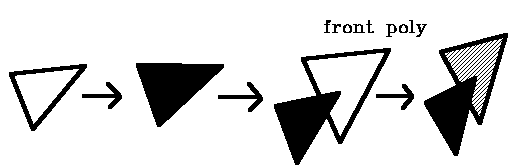
but should be
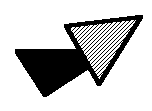
Note: if draw front poly 1st will get:

Can use a unique color for boundary, e.g., use -- for boundary, then
1. draw boundary in --
2. fill polygon
3. redraw boundary in final color --
(requires extra color for temporary boundary color)

 Solid Polygon menu
HyperGraph
Table of Contents.
 HyperGraph Home
page.
HyperGraph Home
page.